Reader-supported: As an Amazon Associate I earn from qualifying purchases, and some links go to eBay through its partner program. The picks are mine, affiliates don't pay for placement and don't shape what I recommend.
- Direct Google Successor (No C-Wire Needed): Nest Learning Thermostat (4th Gen) (~$250) — Domed glass borderless display, works without a C-wire in most homes, restores full Google Home app scheduling.
- Best All-Platform / Apple & Home Assistant: ecobee Smart Thermostat Premium (~$230) — Built-in air quality sensor, included smart room sensor, Apple HomeKit and Alexa compatibility.
- Best Budget Smart Pick: ecobee Essential / ecobee3 lite (~$120) — Dependable Wi-Fi scheduling and smartphone control for half the price.
- Best for Multi-Zone / Commercial Reliability: Honeywell Home T9 (~$160) — Outstanding 200-ft remote room sensor prioritization for uneven two-story temperatures.
What I swapped mine for
I swapped my Gen 2 Nest for the Google Nest Learning Thermostat (4th Gen).
The swap itself. Shut the breaker off to the air handler furnace first—popping a 3-amp automotive fuse on an HVAC circuit board turns a 20-minute job into an afternoon search for replacement blade fuses. Pull the old puck off the wall, snap a quick photo of the labeled wire slots (R, W, Y, G, C), press the terminal buttons to release the copper, and unscrew the sub-base. The 4th Gen base covers almost the exact footprint, and Google includes a clean trim plate if your drywall behind the old bracket has an unpainted ring. The push terminals on the 4th gen grip standard 18-gauge solid thermostat wire smoothly. Total swap time was 18 minutes with one multi-bit screwdriver.
What carried over. The tactile rotary dial feel, auto-away routines, learning algorithms that adapt to when your family wakes and leaves, and seamless integration into the Google Home app.
What changed. The screen is a massive visual jump. The 4th Gen uses an edge-to-edge domed glass display with Dynamic Farsight that shifts from room temperature to outdoor weather as you walk toward it. It also runs Matter over Wi-Fi, meaning it is no longer locked into Google's proprietary ecosystem wall if you run Home Assistant or Apple devices alongside it. System health monitoring is noticeably sharper: it flags furnace short cycling or slow temperature recovery before a heating lockout occurs.
What it cost. ~$250 at current street pricing. If your old installation ran fine without a C-wire, the 4th Gen power management handles the same circuit without pulling new conductors.
The short version
Your old Nest still heats and cools the house. It just stopped being smart. If you used the app, the schedules, or the away features, the Nest Learning Thermostat 4th gen (~$230-$280) is the direct successor: everything you lost comes back, and it runs without a C wire in most homes, same as your old one. Want out of Google? The ecobee Smart Thermostat Premium (~$230) is the best all-platform alternative. On a budget, the ecobee Essential (~$120) gets app control back for half the money. Google's half-price replacement offer expired December 31, 2025, so ignore any page still promising it. And if you never used the smart features at all, keeping the old Nest as a plain wall dial is free and completely reasonable.
What Google actually killed on October 25, 2025
Google announced it in April 2025 and followed through six months later: the Nest Learning Thermostat 1st generation (2011), 2nd generation (2012), and the European 2nd generation (2014) lost software support. Google's own support page spells out the split between what died and what survives, and the split is the whole story.
| Feature | Status since 10-25-2025 |
|---|---|
| Heating and cooling control at the dial | Still works. Temperature, mode switching, saved auto-schedules. |
| App control (Nest app, Google Home app) | Gone. The device was removed from both apps. |
| Remote control and status from your phone | Gone. |
| Notifications and alerts | Gone. |
| Home/Away Assist, multi-device Eco | Gone. |
| Nest Protect emergency HVAC shut-off link | Gone. |
| Third-party assistant integrations | Gone. |
| Software and security updates | Gone, permanently. |
Not affected: the 3rd gen (2015), the Nest Thermostat E, and the 2020 Nest Thermostat. Those keep full app support with no announced end date.
Two dates matter for your wallet. Google offered affected US and Canadian owners the 4th gen at $149.99, roughly half price, one code per affected thermostat. That offer died December 31, 2025. European owners got 50 percent off a Tado Smart Thermostat X starter kit by email instead, because Google also announced it will no longer launch new Nest thermostats in Europe at all. Both lifelines are gone. If you are reading this in 2026, you are shopping at street price.
April 2026 added the legal chapter: a class action, Tsourdinis v. Alphabet Inc. (N.D. Cal., case 5:26-cv-01770), on behalf of everyone who owned a gen 1 or 2 on the cutoff date. It argues Google disabled a product people paid for. No settlement exists, no claim portal exists, and cases like this take years. Make your thermostat decision on its own merits.
If you never opened the app, you lost nothing. The old Nest keeps running heating and cooling at the dial, including schedules saved before the cutoff. No new updates will ever come, and app-dependent settings are frozen, but as a plain programmable thermostat it works. I know households running gen 2 units exactly this way and they are fine. The rest of this page is for everyone who actually used the smart features and wants them back.
Confirm which Nest you have
The cutoff itself is the cleanest test: if your Nest vanished from the Google Home or Nest app on October 25, 2025, it is a gen 1 or gen 2. If it still shows up and responds in the app today, it is a 3rd gen or newer and this page does not apply to you yet.
No app history to check? Pull the display off its base (grip the outer ring and pull straight toward you) and read the model number on the back, then match it against Google's end-of-support page, which lists the affected models. Gen 1 and 2 are also the thickest of the round Nests, a visibly chunkier puck than the slim 3rd gen.
Check for a C wire before you order anything
This is the step people skip and regret. Your old Nest was unusually tolerant of ancient wiring: gen 1 and 2 steal power from the heating and cooling wires, so a lot of the homes they went into never had a C (common) wire pulled to the thermostat. Some replacements handle that gracefully. Some do not.
- Kill power to the HVAC air handler at the breaker. Low-voltage wiring will not shock you, but shorting two wires with a screwdriver can pop the transformer or blow a fuse on the control board. Thirty seconds at the panel is cheaper.
- Pull the Nest display off its base. The wires land on the base's labeled terminals.
- Photograph the base. You want the wire colors and the terminal letters in one clear shot. This photo is your install map later.
- Look for a wire in the C terminal. A wire landed on C means every thermostat on this page installs with no drama. An empty C terminal means read the compatibility notes below before choosing.
The Nest 4th gen runs without a C wire in most homes, and Google's official fallback is the Nest Power Connector (~$25), a small module that wires in at the air handler. The ecobee Premium ships with a Power Extender Kit in the box that solves it for most systems, but the kit needs at least 4 wires at the thermostat and does not cover millivolt, high-voltage, or dual-transformer systems. The ecobee Essential does NOT include that kit, it is a separate ~$25 part, which quietly erodes its price advantage in a no-C-wire home. The Honeywell T9 includes a C-wire adapter in the box (not for electric baseboard heat). If any of that reads like a foreign language, a photo of your wiring and each manufacturer's online compatibility checker will give you a yes/no before you spend a dollar.
Smart thermostat replacement cost & C-wire requirements compared
Thermostat replacement costs come down to hardware pricing and whether your existing low-voltage wiring requires a C-wire adapter. Because standard residential HVAC wiring is low-voltage 24VAC, DIY installation is straightforward and contractor labor is $0 if you follow basic breaker safety.
| Thermostat Model | Ecosystems | C-Wire Requirement | Approx. Cost | Best Use Case |
|---|---|---|---|---|
| Nest Learning (4th Gen) | Google Home + Matter | No C-wire needed in most homes | ~$250 | Google 1:1 successor / no-rewiring |
| ecobee Smart Premium | Apple, Alexa, Google, Matter | PEK included (No C-wire needed) | ~$230 | Best all-platform / Apple HomeKit |
| ecobee Essential (3 lite) | Apple, Alexa, Google | C-wire required (adapter sold sep.) | ~$120 | Best budget app scheduling |
| Honeywell Home T9 | Alexa, Google | C-wire adapter included in box | ~$160 | Best multi-room / remote sensor range |
| Emerson Sensi Smart | Apple, Alexa, Google | No C-wire for heat/cool only | ~$100 | Traditional keypad look / no hub |
Pick your replacement path
Four paths. Pick the one that matches your situation and skip the rest.
Path A, stay in Google Home: Nest Learning Thermostat 4th gen (most people)
You liked the old Nest. Your household runs on Google Home. You want the learning behavior, the app, and the away features back with the least thinking. This is the direct successor, and it is the unit Google was discounting to affected owners for a reason.
- What you get: Everything the gen 2 did plus a 4th generation of refinement: bigger borderless display, Matter support, and a bundled Nest Temperature Sensor 2nd gen for balancing a far room.
- Power: No C wire needed in most homes, the same trick your old Nest pulled. The ~$25 Nest Power Connector covers the stubborn cases.
- Price: $279.99 list, commonly $230-$240 street. The $149.99 owner discount expired December 31, 2025.
- The catch: You are re-upping with the company that just sunset your last one. The 4th gen is current flagship hardware, which is the best protection available, but I will not pretend the irony is lost on me.
- Nest Learning Thermostat 4th gen on Amazon — check current price on Amazon with the temperature sensor bundled.
- Nest 4th gen on eBay, sealed-box listings were sitting at $189-$199 against the $279.99 list when we checked. Buy sealed, skip anything described as gen 1 or 2.
- Nest Power Connector on Amazon — check current price on Amazon only if the compatibility checker says you need it.

Path B, leave Google: ecobee Smart Thermostat Premium
Google just taught you what happens when your thermostat depends on one company's goodwill, and you would rather your next one speak every platform. Or your house has hot and cold rooms and you want real room sensors doing something about it.
- What you get: The strongest do-everything smart thermostat on the market: Alexa, Google, HomeKit, and Matter, a built-in air-quality sensor, and a bundled SmartSensor for the room that never matches the hallway.
- Power: Ships with ecobee's Power Extender Kit for no-C-wire homes (needs 4+ wires at the thermostat, and millivolt and high-voltage systems are out).
- Price: $259.99 list, commonly ~$230 street. Same money as the Nest, different philosophy.
- The catch: No learning mode. ecobee wants a schedule and sensor rules, not an algorithm guessing your life. Some people prefer that. Old-Nest devotees may miss the magic.
- ecobee Smart Thermostat Premium on Amazon — check current price on Amazon.
- ecobee Premium on eBay, new and sealed listings were running $180-$199 when we checked.
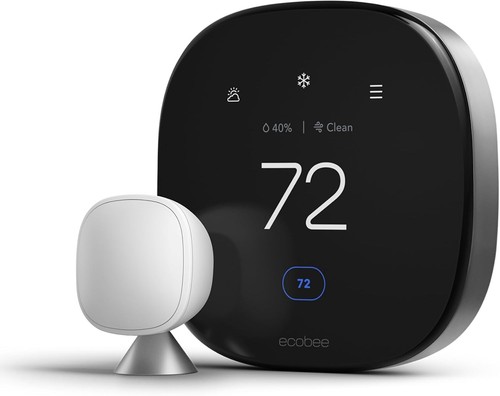
Path C, budget reset: ecobee Smart Thermostat Essential
You want app control and scheduling back and you refuse to spend $230 to get it. You have a C wire, or you are willing to add the ~$25 kit. You can live without room sensors and the premium display.
- What you get: The core of the ecobee experience at $139.99 list, commonly ~$120: app control, scheduling, Alexa, Google, HomeKit, a humidity sensor, and a clean touchscreen.
- What you give up: Room sensors, the air-quality sensor, and the bundled Power Extender Kit. In a no-C-wire home, add ~$25 for the kit and the gap to Premium narrows.
- Price: ~$120. Half the money of Path A or B.
- ecobee Smart Thermostat Essential on Amazon — check current price on Amazon.
- ecobee Essential on eBay, new listings were running $75-$90 when we checked.

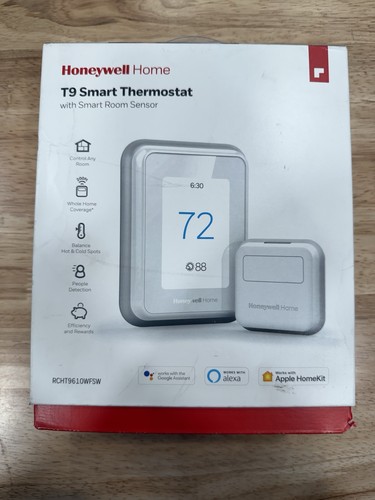
Path D, the thermostat-company thermostat: Honeywell Home T9
You want your thermostat made by a company whose main business is thermostats, on the theory that Resideo has less appetite for sunsetting products than Big Tech. You have uneven rooms and like that the T9's sensors detect occupancy as well as temperature.
- What you get: The T9 with a Smart Room Sensor (model RCHT9610WFSW2003): multi-room averaging, occupancy detection, Alexa, Google, and HomeKit support (HomeKit arrived by firmware update), and a C-wire adapter in the box.
- What you give up: a slick app and a learning mode. The T9 app is workmanlike, and the thermostat follows schedules and sensor rules rather than learning your habits.
- Price: $214.99 with one sensor when we checked, $189.99 without. Sold on Amazon through third-party sellers rather than Amazon itself, so check the seller line before you click buy.
- Honeywell Home T9 on Amazon — check current price on Amazon with one sensor, third-party sellers.
- Honeywell T9 on eBay, open-box units were listed at $95-$120 when we checked, a legitimate value play on a thermostat with no expiry clock.
Swap it without drama
- Run the manufacturer's compatibility checker first. Google, ecobee, and Honeywell each have one. Feed it the wiring photo from Step 2 and it answers in two minutes. Cheaper than a return label.
- Kill HVAC power at the breaker. Same reason as before: one slipped screwdriver across two terminals can take out a control-board fuse.
- Remove the old Nest base and its trim plate. Two screws. Keep the wall anchors, most new bases reuse the holes or come with a trim plate that hides the scars.
- Land the wires on the new base, matching your photo. Terminal letters carry over directly in almost every case (R, W, Y, G, C). If your photo shows something odd, stop and use the checker's live-chat rather than guessing.
- Power up and run one full heat cycle and one full cool cycle. Do not stop at "the screen turned on." Confirm the furnace fires and the compressor starts, then set up the app, schedules, and sensors.
- Write the install date on the base with a Sharpie, then recycle the old Nest. It has a lithium cell inside. Best Buy, Home Depot, and Lowe's e-waste bins all take it. Do not bin it with household trash.
What NOT to do
eBay still moves old round Nests, and in photos a gen 2 looks a lot like newer rings. Whatever the price, you are buying the exact device Google just cut off: no app, no updates, frozen settings. If a listing does not name the generation or show the model number, assume the worst.
The class action is real and unresolved. There is no settlement, no payout schedule, and no guarantee there ever will be one. If your heating comfort depends on app control today, waiting on federal litigation is not a plan.
The cloud services those features depended on are off. Community projects exist that rehost some functions on a local server, and they are genuinely clever, but they are unofficial, unsupported, and firmly hobbyist territory. Nobody you pay on a classifieds site can bring back Google's cloud.
If you have an unusual setup
Heat pump, dual fuel, or multi-stage systems
All four picks handle common heat-pump and multi-stage configurations, but this is exactly where wire counts and terminal letters get weird (O/B reversing valves, W2, AUX). Run the compatibility checker with your wiring photo rather than trusting a spec table, including mine.
Electric baseboard or other line-voltage heat
None of the thermostats on this page control line-voltage baseboard heat, and neither did your old Nest, so if you are reading this page you almost certainly do not have it. If you do have baseboard circuits elsewhere in the house, those need a line-voltage smart thermostat, a different product category.
European gen 2 owners
Your unit hit the same October 25, 2025 wall, and Google is exiting new thermostat hardware in Europe entirely. Google's offer there was 50 percent off a Tado Smart Thermostat X kit by emailed code. The US picks on this page ship with US radios and support, so shop the Tado X instead.
Related diagnoses
FAQ
Did Google brick my old Nest thermostat?
Not in the literal sense, and the distinction matters. On October 25, 2025 Google removed Nest Learning Thermostat gen 1 and gen 2 units from the Nest and Google Home apps and ended remote control, notifications, Home/Away Assist, and software updates. The thermostat itself keeps running your heating and cooling. You can still change temperature, switch modes, and manage previously saved schedules at the dial. It went from a smart thermostat to a wall dial. A class action filed in April 2026 argues that amounts to disabling a product people paid for. Google's position is that the device still performs its core function.
What is the best replacement for a Nest Learning Thermostat gen 1 or 2?
For most owners, the Nest Learning Thermostat 4th gen (~$230-$280). It restores every feature you lost, keeps you in the Google Home app, and handles most homes without a C wire, the same power trick your old Nest used. If you want out of the Google ecosystem, the ecobee Smart Thermostat Premium (~$230) is the strongest all-platform alternative. If you just want app control back at the lowest price, the ecobee Essential (~$120) covers the basics.
Is Google's half-price Nest replacement offer still available?
No. Google offered affected US and Canadian owners the 4th gen Nest Learning Thermostat at $149.99 (about 50 percent off) with one code per affected thermostat. That offer expired December 31, 2025. In Europe the offer was 50 percent off a Tado Smart Thermostat X starter kit by emailed code. If you are shopping today, plan on street price.
Do I need a C wire to replace my old Nest?
Check before you buy, because your old Nest was unusually forgiving. Gen 1 and 2 Nests steal power from the heating and cooling wires, so many of the homes they are installed in have no C (common) wire behind the thermostat. The Nest 4th gen works without a C wire in most homes, and Google sells a Power Connector (~$25) for the rest. The ecobee Premium ships with a Power Extender Kit for no-C-wire homes. The cheaper ecobee Essential does not include that kit. The Honeywell T9 includes a C-wire adapter in the box. Pull your old Nest off its base and look at the wires before ordering anything.
Is the 3rd gen Nest Learning Thermostat affected?
No. Google's end of support covers the 1st gen (2011), 2nd gen (2012), and the European 2nd gen (2014) only. The 3rd gen (2015), Nest Thermostat E, and the 2020 Nest Thermostat keep full app support. No end-of-support date has been announced for them. Worth knowing: the 3rd gen is now a decade-old product.
Is there a lawsuit over the Nest thermostat shutdown?
Yes. Tsourdinis v. Alphabet Inc. was filed in the Northern District of California in April 2026 (case 5:26-cv-01770) on behalf of owners who had a gen 1 or 2 Nest Learning Thermostat on October 25, 2025. It claims breach of contract and consumer-protection violations. As of publication there is no settlement and no claim portal. Do not delay a replacement decision waiting on it. Cases like this take years.
Should I buy a used Nest thermostat on eBay?
Not a gen 1 or 2. They look identical to newer rings in photos and they are the units Google just cut off, so you would be buying a wall dial with no app, no updates, and no support. A used 3rd gen still works with the app today but is a 10-year-old product with no announced support guarantee. If you want the Nest experience, buy the current 4th gen new. If you want cheap, a new ecobee Essential beats any used gamble at nearly the same price.
Can I just keep using my old Nest as a dumb thermostat?
Yes, and if you never used the app features, that is a perfectly rational choice that costs zero dollars. The device still controls heating and cooling at the dial and runs schedules saved before the cutoff. Two real limits: you cannot change settings that required the app, and there will never be another software or security update. Treat it like any other programmable thermostat and it will keep doing its job until the hardware dies.
How much does a Nest Thermostat replacement cost?
The Nest Learning Thermostat 4th Gen costs ~$250 and installs without a C-wire in most homes. Multi-platform flagship alternatives like the ecobee Smart Thermostat Premium cost ~$230 and include a Power Extender Kit. Budget smart replacements like the ecobee Essential cost ~$120. DIY installation takes 20 minutes with a single screwdriver, making contractor labor $0.